3com hubsAfter I wired my house for Ethernet, I needed a way to connect everything. I bought a cheap 8 port 10mbit hub, and it worked. A few months later, I bought a 24 port 10mbit 3com hub on ebay. It was a 1U form factor, and was designed to also wall mount. This made it very easy to put in my wiring closet. There was too much fan noise, so I called 3com. 3com has a 'limited lifetime' warranty on their serious hardware. The hub was covered. I mailed it in, and they mailed me a new one, and even threw in the 1U/wall mount adapters for free. The fan noise was much reduced. Well, time moves on, and fast Ethernet hardware gets cheaper. I was able to get a 24 port 3com 10/100mbit hub for free from a networking/LAN party group. It also had too much fan noise. It was also covered by the 'limited lifetime' warranty. I called 3com (on a Sunday morning), and they answered, and are advance shipping me a replacement hub. They are also paying for return shipping. They didn't even want my credit card, since I am 'on file' with them. I am really impressed with their good attitude. Their products are also first rate. For those who are concerned with fan noise, there are a few points to consider.
|
This is a 10/100 8 port switch. It worked for a few years and then failed. After another switch failed, I took a look at it. When I was moving it, something heavy inside was rattling around. After I opened it up, I saw a heatsink that obviously went on the main quad flat pack chip, which was clearly the switch, had come unglude. I pushed it back on. The switch seems to be working now. Clearly the switch chip overheated when the heatsink fell off. Obviously, gigafast should have glued it on better. Even though it is out of warranty, heatsinks should never fall off.
I purchased this in June 2023. It supports 2.5g, 1g, 100mbit and 10mbit speeds. It seems to work fine when both ends of the network are running at 2.5g speeds. However, when one end is 2.5g and one end is 1.0g it doesn't work reliably. Sometimes, I can transfer data at fill speeds, Other times (and the usual case) I can only transfer data around 50 mbytes/second. I am not sure what makes it run quickly or slowly. I have become very familiar with iperf3, which is a great tool to measure network transfer speeds. Using it, I have measured 942 mbytes/sec when things are working well and 492 and 536 mbits/sec when it is not working well. The switch is version 1.0a. I have contacted trendnet for a replacement. Trendnet sent me a replacement which works.
This was one of the first cheap gigabit switches that supported jumbo frames. I purchased it Nov-2007. It started acting flaky a few months ago. Last week, it died completely. If it was more valuable, I would test the electrolytic capacitors and replace any bad ones. It did have a 5 year warranty, so no big complaints. Buy hardware with a long warranty. 1 year is a joke. I replaced it with a 8 port D-Link gigabit switch. It hasn't died completely. It does transmit data, but is quite flaky. Sometimes, it does full gigabit, and sometimes it is pretty slow. It took a lot of debugging to realize the switch was at fault.
I bought a Best Data CMX110 cable modem around 2001. In Dec 2005, I started having problems downloading data from the Internet. Thanks to some help from Comcast, they were able to determine that 20% of the pings were failing and that the ping times were very long. They suggested my cable modem might be suspect. I thought it was a silly idea, as it was hard to imagine that it could partially fail. I bought a Motorola surfboard cable modem. It solved all of my problems. The Best Data modem had partially failed. I have not investigated the cause of the failure yet. Since I have to call Comcast to enable a new cable modem, it is not trivial to debug.
It worked fine for about a year. Then it failed. I called the cable company and after lots of fussing around it started working again. Failed completely one week later. Replaced under warranty. I called around 9pm and someone quickly answered and as soon as I told them it was a retail unit, they gave me return instructions. No EVGA bull*hit about needing the sales receipt, or having to register online. I did have to pay return shipping, but that is pretty standard for retail goods.
Purchased in 2012. This unit has a fan which has recently started to make more noise. I contacted Rosewill by email to ask the fan specs, so I can replace the fan. In over 2 weeks, they have replied to me 4 times, asking me silly questions like when I purchased the fan (even though I gave them the model number). They have yet to tell me anything about the fan. So I decided to call them up. They said someone would call be back within the hour with the info. After waiting over 5 hours, I called again. They claim that someone called me and left a message (which was untrue). I was at my phone all day, and there were no messages. They claimed that the switch didn't have a fan, which is clearly not true. They said someone would call me back, and the actually did. They did clahm to have left a message. They said they know nothing about what is inside the switch. I find that a bit odd, but the switched are made in China. I don't expect 3com kind of support, but I expect that simple questions can be answered by email in a timely fashion. I expect not to need to call them up. I expect them not to lie to me. My expectations were not met. I could take the switch apart and find out the fan specs. Unfortunately for me, there are over 20 cables plugged into the switch, and the switch is bolted to my wall. I would really like to have a replacement fan in hand when I take the switch apart. It looks like that won't happen... I cannot recommend Rosewill due to their clueless, slow and lying tech support.
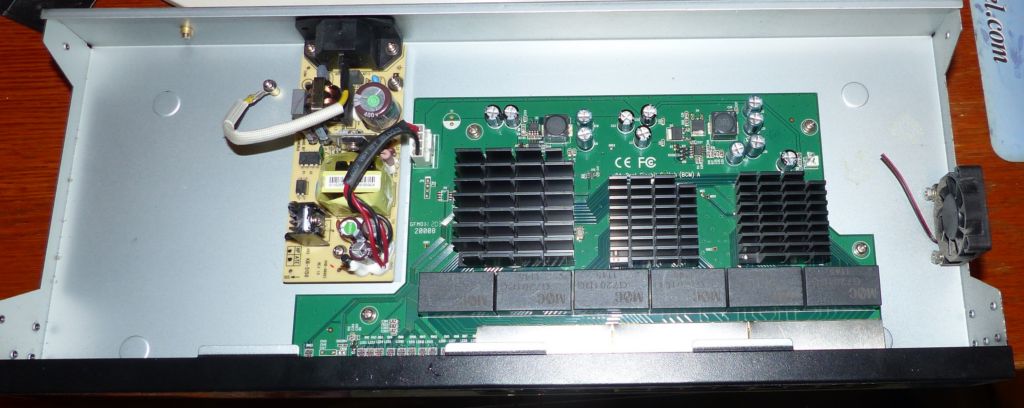
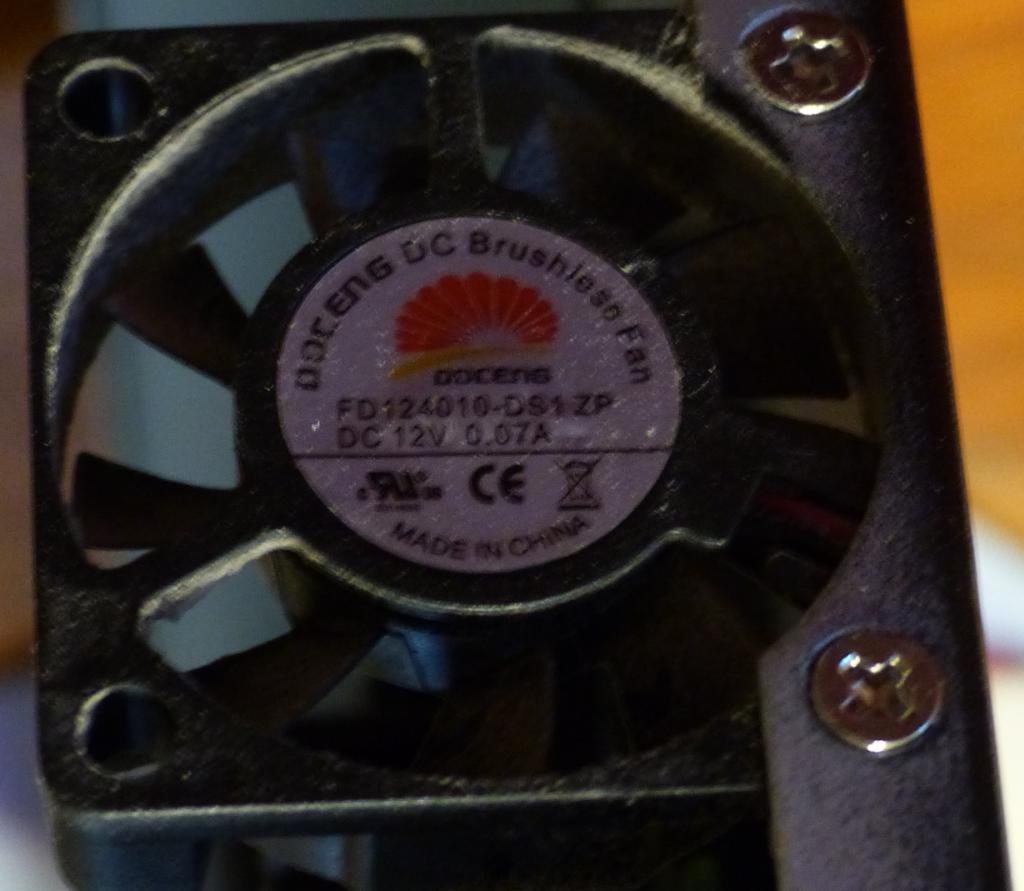
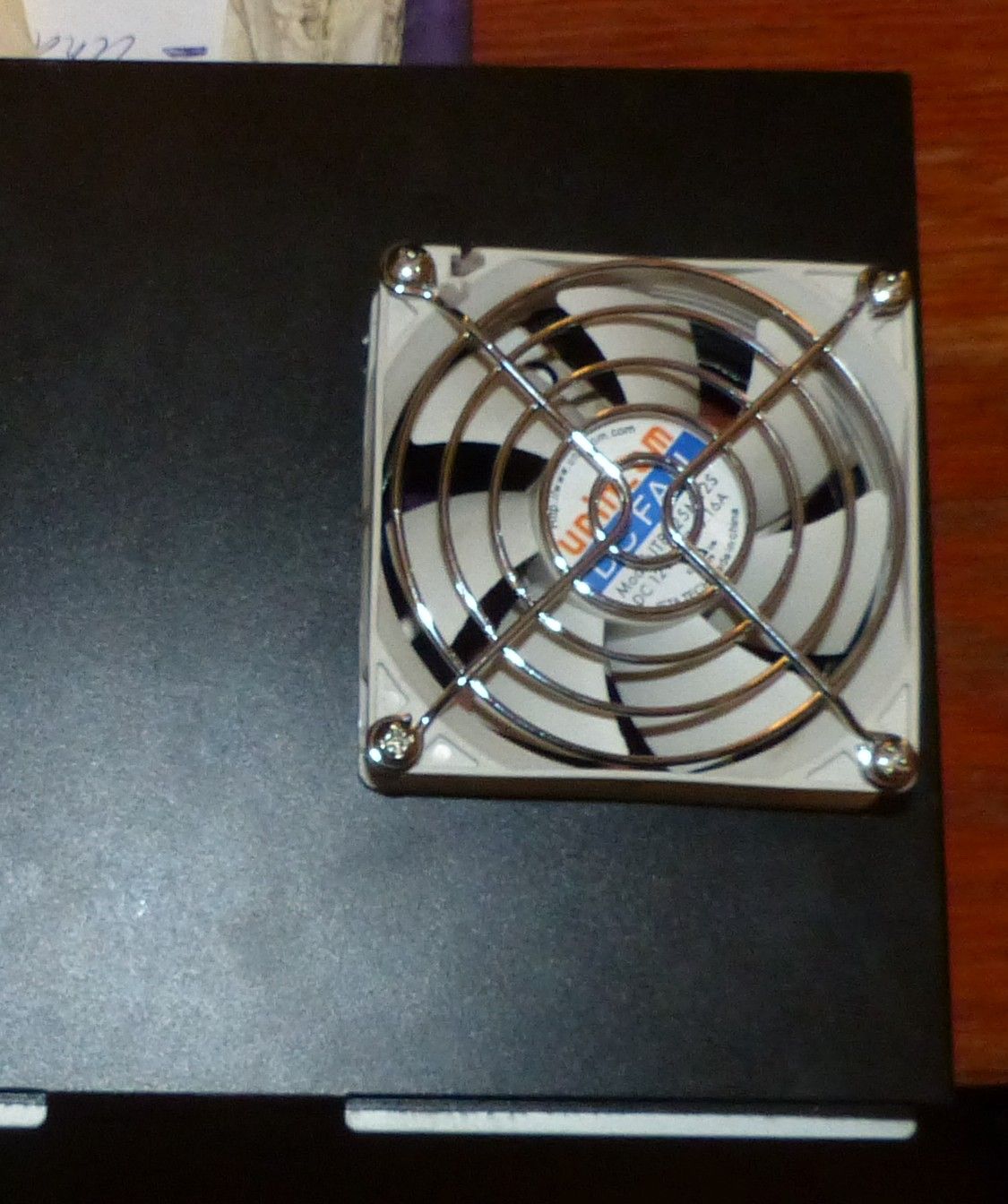
The switch fan was making more noise, so I decided to fix it. I think the fan is a Doceng FD1240010-SS1-ZP fan, which is 12v, 0.07a. It turns out that the fan is a 40mm x 10mm thick fan. What is worse is that it is a sleeve bearing fan, which is not supported to be mounted horizontally. Of course, if you put the switch in a rack it is fine, but if you screw the switch against a fall, it is bad, which is what I did. I saw a teardown of a Zonet 24 port switch, and it used a 40mm x 20mm fan (AD0412MB-C50) which is a ball bearing fan. Nonetheless, the fan lasted about 70k hours, which isn't too bad. I decided to replace the fan with a 80mm x 25mm fan, which I would mount outside the case. The 80mm fan is 4 times larger, and should move more air, be quieter, and be easy to replace. The 2 pin fan connector on the Rosweill switch was glued in place (which is a good idea). What is not a good idea, is the fan is wired backwards compared to conventional 3 pin fans. So I cut off the OEM connector, and soldered it to my 80mm fan. I also added a resistor to slow the fan down, and make less noise. It still moves more air than the OEM fan did. Now I have a reasonably quiet switch, which should last a long time.
I purchased this in 2018. In early 2023 it failed. The web-GUI still works, but it can't detect any wireless networks. I don't expect consumer gear to last forever, but I do expect it to last for more than 4 years. There has never been a firmware update for this, which may be because it is so simple, or because the bugs found were never fixed. I replaced it with a linksys dual band AC repeater-extender.
After leaving it unplugged for a few days, I plugged it in, and it was able to detect wireless networks. No idea why. I guess I didn't leave it unplugged for long enough. I did unplug it several times, and I did perform 3 factory resets.
Recently, I purchased a Belkin router. I have a bunch of other Belkin stuff, and it all works fine. This router does not have a print server, but I already have an Ethernet connection on my big printer. Included in the case is a 4 port switch. This new router has stateful packet inspection and NAT, which makes for a pretty robust firewall.
The plastic case looks unremarkable. It was easy to configure, and seemed to work well. After a few days of use, the DNS server seemed to fail. From a DOS box, I was unable to successfully ping www.ibm.com (my standard host to ping). I did the kludgey windows "ipconfig/release and then ipconfig/renew" trick, and it didn't help. I rebooted my machine, and everything was working fine.
Roughly every 24 hours, I have the same problem. Sometimes, the release/renew thing fixed the problem. Sometimes not. I sent email to Belkin tech support. They said download a new version of the router software. Unfortunately, it was for a different Belkin router. Fortunately it was smart enough to not install. After a few more go-rounds with Belkin tech support, they said to call them on the phone.
The guy I spoke to was pretty unhelpful. He said to manually set my network card speed. I told him it worked just fine with another router. He wanted to set it anyway. I told him I didn't want to do so. He said all he could suggest was to set a fixed IP address for my machine. I told him I had 10 machines, and I didn't want to have to set the IP addresses for all of them. He said I could set the DNS address manually, and I told him that the purpose for the DHCP server inside the router was to not have to do this. I asked him if there was a new version of the software for the router, and he said no, there were no problems with the existing software. I told him there were problems, because I was having them. He was pretty unhelpful.
It turned out that the problem was not with the Belkin router, but with ZoneAlarm firewall software. See ZoneAlarm for more details. I was unimpressed with Belkin tech support, but the Belkin hardware is pretty reliable.
In Sep 2005, my Belkin router became unreliable. I had to reset it every day or so. I called tech support, and they had good ideas. They had me reset the router, but the problem persisted. I had switched to my D-Link Router and it worked fine for over a week. I called Belkin back and told them. We tried the Belkin router again. Same problem. Switched back to D-Link, and it worked. Belkin sent me a new router. It has the same part number, as the old router, but it about half the size. Didn't fit in my network closet as it was so small. I need to drill new holes to secure it. Belkin didn't ask for the old one back. It has worked with no issues. First rate technical support. This demonstrates a good reason to have a spare router.
After my problems with my Netgear router, I needed a new router in a big hurry. Since the D-Link DI-704P was on sale, I bought it. Included in the case is a 4 port switch. The plastic case sure looks flimsy compared to the steel case of the Netgear. However, in operation, it is rock-solid. It was trivial to configure, and has worked flawlessly. I highly recommend it. It even has a parallel printer port for a print server, though I have not tried it. This router does not have stateful packet inspection, but uses basic NAT technology.
Someone gave me this router, I presume they got something better. This is a basic wireless 802.11g router. The one I got was v8, which is a pretty new one, that has 2mb of flash and 8mb of rom. Inside it is running a stripped down version of linux. There are various open source projects that have software that runs on this hardware, with more features than Linksys provides. The main feature I wanted was 'AP Isolation', which isolates each wireless client from each other, so they can only talk to the wireless router. Of course, the open source projects support this. It was a bit complex to put the distribution on the router, since there was only 2mb of flash, but there is a well documented procedure to do it. It works great. It has many more options that the Linksys software, most of which I don't need.
This router replaced my Linksys WRT54g router. It supports 802.11N at 2.4 ghz and has gigabit Ethernet ports. It also can be flashed to open source firmware. I purchased it Oct-2010. In Aug-2014 it failed. Complete catastrophic failure. It would be nice if it lasted longer.
I got a R6400 router. The good news is that though it is a few years old, netgear provides firmware updates. There are some issues. The router does not support AP isolation (access point isolation). This isolates wireless devices from each other, to make man in the middle attacks more difficult. This is a pretty standard wireless security feature. I was able to configure the router in a straightforward fashion. In use, DNS does not work reliably. I tried using DNS servers from google and cloudflare, but that didn't help. Using a web browser, when I go to a well known site suck as gmail.com or youtube.com, I get a browser error saying it can't find the domain, and asking if I want to try again. If I click on try again, it usually works. I have a similar issue with other programs which rely on DNS. I switched back to my old router, and I have not had any DNS issues. The router is too old for free netgear support. A friend who was using the R6400 router didn't notice any issues, which I find odd. Perhaps a new version of firmware will fix the issue. I have not found any to report the issue to netgear, which would likely help in diagnosing and fixing the issue.
I did another factory reset and reloaded the firmware. I still had DNS issues. I decided to use some open source firmware. It installed without issue, and I have fully configured it. No DNS issues. It is clear the problem was with the netgear firmware. It would be nice if there was an easy way to report bugs with netgear router firmware, but no such luck.
This is a dual band wireless N router, with a claimed speed of 300 mbytes per second for the 2.4 and 5ghz frequencies. It has 8mb of flash and 64mb or ram. It has a 100 mbit WAN and four 100 mbit LAN ports. One may ask how to get 300 mbits per second from the WAN, when the connection is only 100 mbits per second. Any serious router needs at least a gigabit WAN connector, and it would be quite handy to have gigabit LAN connections as well. The router supports WPS (wifi protected setup) which is a really serious security issue. Worst case, 11,000 guesses will guarantee getting access to the router as well as the wifi password. There is no way to disable this, though some Netgear routers limit the guessing to once per second. This way, it will take a worst case of 3 hours to break into the router. I flashed the router to use non-Netgear firmware that does not support WPS. The router may be stood on edge by using two 'feet' that attach to the side of the router. There is no provision to mount the router to a wall, unlike all of my Linksys routers (and every non Netgear router). I got the router used, and one of the feet was missing. I called Netgear, asking for a replacement foot. They are not available. They did say the power adapter was available, but they said the feet were unavailable. I only recommend Netgear products if you don't care about support (see the problems with my RT-314 router and you don't intend to use their firmware, as it is quite insecure. What would expect from a company that has installation instructions that say "NETGEAR recommends that you do not change the preset SSID or password. If you do change the settings, the information on the product label does not apply."
This is a single band wireless N router, with a claimed speed of 300 mbytes per second for the 2.4ghz frequencies. It has a 1000 mbit WAN and four 1000 mbit LAN ports. It comes with a linux operating system and 128mb of flash and 128mb of ram, which is more than typical routers. It also has a usb2 port which can be used for storage. I cannot recommend standard Netgear firmware as it has a variety of bugs as well as security issues such as backdoors. With this router, it is straightforward to load it with a variety of open source firmware, which is likely more secure than Netgear's firmware. If you are not afraid of terrible Netgear support, the hardware seems quite capable. Using DD-WRT I was able to download at 62 mbits/sec. The hardware is capable of about 255 mbits/sec. I have heard newer routers have hardware acceleration that the open source router software doesn't have access to.
The WNDR 4700 has a bunch of features. It has room for an internal hard drive. It has dual band 450mbit/second radios. It has a gigabit WAN and 4 gigabit LAN Ethernet ports. It has two usb 3 ports. It has a SD slot. It also has a few less desirable features. The router supports WPS (wifi protected setup) which is a really serious security issue. Worst case, 11,000 guesses will guarantee getting access to the router as well as the wifi password. There is no way to disable this, though some Netgear routers limit the guessing to once per second. This way, it will take a worst case of 3 hours to break into the router. But wait, there is more. It comes with a backdoor. This allows anyone on the LAN to take over the router. Even better, if remote management is allowed, anyone on the internet can take over the router. Because there is no non-Netgear firmware currently available for this router, I won't attach it to my network, or even power it up. I understand some people want the convenience of WPS. I have no problem with that, as long as there is a way to disable it completely. However, a backdoor is inexcusable. I cannot recommend this router under any circumstances.
I purchased this Nov-2014 when it was on sale for $60. It is an 802.11ac router with all the usual features. It supports a/b/g/n as well as ac. It has simultaneous dual band. It has 6 antennas, 3 internal and 3 external. It has 2 usb 2.0 ports. Other routers have usb 3.0 ports, but they all suck for file transfer. The user interface is reasonable enough. One problem I have found is if you have a DHCP lease, there is no way release the lease. This isn't a showstopper, but it is annoying. I haven't measured wireless transfer rates, but using the wired network (all gigabit ports), I have measured 216 mbits per second downlink. It idles at around 2 or 3 watts, so it runs nice and cool. It isn't the fanciest router, but it is quite reasonable.
I bought a different wireless router a few years ago. I didn't realize it had WPA. When the vulnerabilities of WEP became known, I decided to not use any wireless router without WPA. Recently, the Trendnet 432 was on sale, so I decided to buy it because it has WPA. The good news is that it works. The bad news is that virtual server settings do not allow a range of ports. So if you had some virtual server that happens to use 10 sequential ports, you will have to make 10 rules in the virtual server settings. Other than that, I have found no problems with the router. And for those who are interested, my WPA PKA passphrase has over 30 characters...
If you have comments or suggestions, Email me at turbo-www@weasel.com
Created with gnu emacs and template-toolkit, not some sissy HTML editor.
No Java or javascript needed to view my web pages. They
both have significant security issues.